Hello,
Our MEs KPIs have a configuration for specifying the target values.
However, we have a customer that requires values according to each resource.
i.e., different resources may have different target values.
An ideia could be to have a generic table to hold these target values per resource and override them by catching an event, but i’m not finding anything suitable…
Any thoughts on this?
Hello Nuno,
Thank you for your contribution.
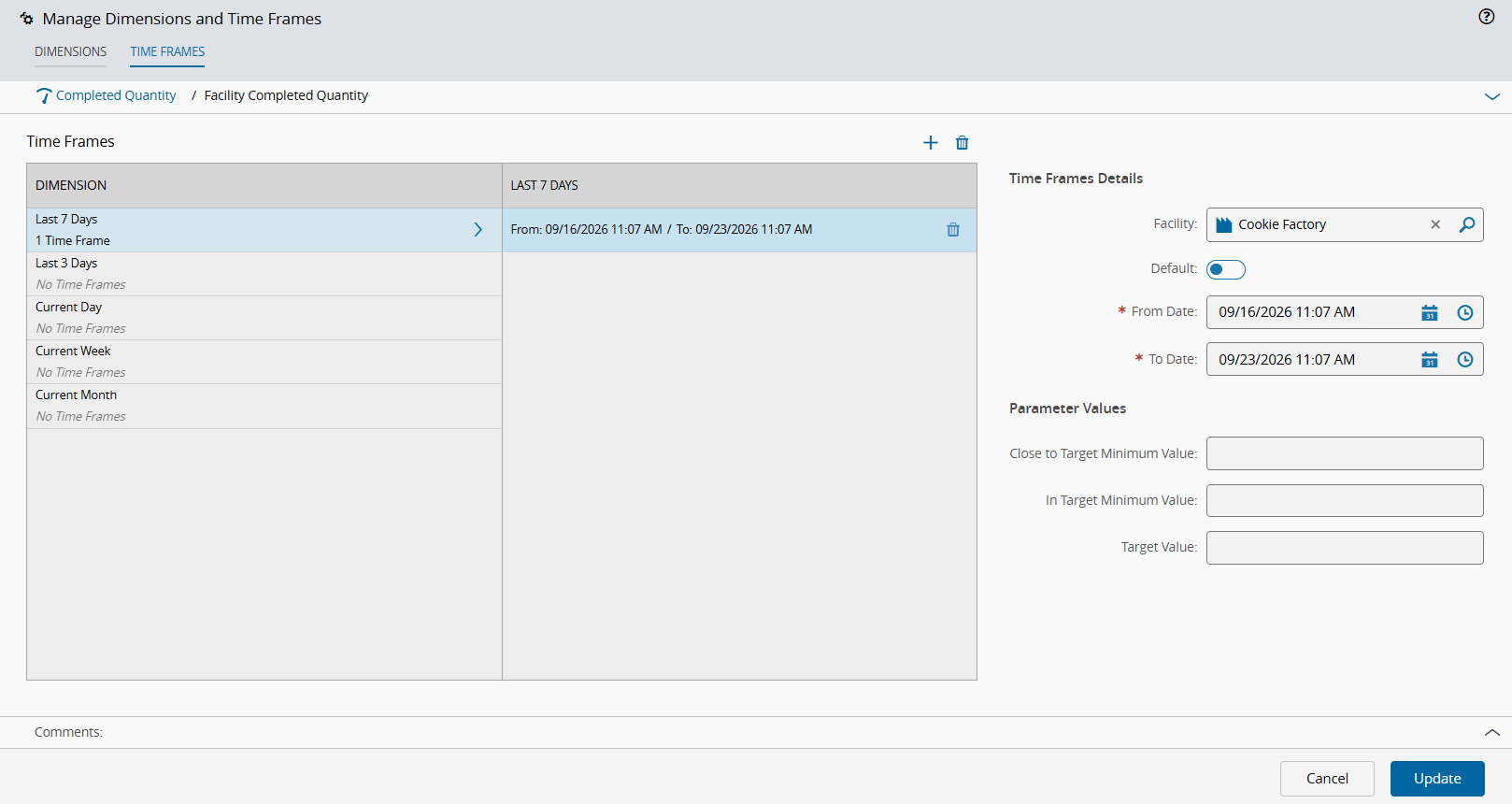
There’s already a native mechanism for this: KPI Time Frames
You don’t need a custom table — the KPI model natively supports per-entity target overrides through Time Frames, tied to Dimensions.
How it works
- KPI Dimensions define how a KPI value is calculated for an entity (value type, source — Business Rule, ODS, DWH, or Cubes).
- KPI Time Frames let you override the target thresholds for a specific entity instance (e.g., a specific resource/step), within a given date range. Each time frame lets you specify:
- Entity’s name — i.e., the specific entity instance (your resource) the override applies to
- Whether it’s the default time frame or not
- From date / To date — the validity window for that target
So, for example, you can define a time frame scoped to “Mixing” (or your resource) for “Current Day” with its own target values, and a different time frame for another resource/entity, each potentially with different date ranges (e.g., to handle seasonal production peaks).
How targets are resolved at runtime
For Dynamic KPIs, the system resolves target-related fields in this order — runtime execution first, then falling back progressively:
| Field |
Resolution order |
TargetValue |
runtime execution → KPI.DefaultTargetValue |
CloseToTargetMinimumValue |
runtime execution → KPITimeFrame.CloseToTargetMinimumValue → KPI.DefaultCloseToTargetMinimumValue |
CloseToTargetMaximumValue |
runtime execution → KPITimeFrame.CloseToTargetMaximumValue → KPI.DefaultCloseToTargetMaximumValue |
InTargetMinimumValue |
runtime execution → KPITimeFrame.InTargetMinimumValue → KPI.DefaultInTargetMinimumValue |
InTargetMaximumValue |
runtime execution → KPITimeFrame.InTargetMaximumValue → KPI.DefaultInTargetMaximumValue |
This means the KPITimeFrame entity is exactly the “per-entity override table” you were thinking of building yourself — it’s already part of the data model, tied to the entity instance (your Resource), with fallback to KPI-level defaults when no specific time frame applies.
Practical steps
- Go to the KPI’s Manage Dimensions and Time Frames screen.
- Add a Dimension matching your calculation source.
- Add Time Frames, setting the Entity’s name to each Resource that needs a distinct target, with its own thresholds.
- Resources without an explicit time frame will simply fall back to the KPI’s default target values — no event-catching or custom override logic required.
This should cover your “different resources, different targets” requirement natively, without a custom table or event-based override.
Sources:
Hello,
Would limit sets be an option for this? Not sure how tightly they are linked to parameters. But some level of customization would be needed either way I guess.
Best Regards, Tom
Hello Tom, since each KPI can be customized with any target values and associated with any resource, we believe the solution already provides the necessary flexibility and dynamic behavior required.
